Lutris & The Burden of Absurd Attention to Detail
Lutris
The Absolute State of Games Managers on Linux
Outside of Steam, there are surprisingly few robust options for games management on Linux. Heroic Games Launcher is both popular and handles Epic and GOG libraries well, but suffers the burden of being an Electron app (derogatory). Cartridges is a fantastic, lightweight frontend, but it relies on other launchers to do the heavy lifting. But there is also Lutris.
I really like Lutris, whose mascot is a freakin’ sea otter! It offers power-user control without feeling like a heavy “app”, it doesn’t try to look like a storefront, and it just manages your games and runners. Lutris also works surprisingly well for non-game software like the Affinity Suite, largely thanks to a community writing scripted installers that make setting up complex dependencies easy.
But I don’t think Lutris is perfect. The codebase hasn’t scaled very elegantly and has accumulated years of features without a cohesive cleanup, making it a somewhat confusing experience to use. The interface feels like a maze of scattered menus that can easily overwhelm most people. And it is also lacking in some basic aesthetics.
All I really want is a program to manage my ridiculous library of games. Nothing that looks like a social platform, or overly fancy CSS, or exaggerated animations, or a layout where three boxart covers monopolize my entire monitor. Lutris is almost there. So, I took it upon myself as a decent exercise to fork Lutris. Just for fun!
Before we get started…
Disclaimer: I am not “your guy”! I am not looking to solve any problems other than my own, and I am under no delusion that this is interesting to anybody else. The things that annoy me might not bother you at all. I am not a software developer, and I don’t claim to have particularly good opinions.
I don’t pretend to understand the dark magic behind Wine, compositors, or even retro emulation if I am being completely honest. This application is for a very niche group of people, and I am probably not even in that group of people. I am just a dude who wanted a slightly better interface for Lutris.
So if you’re cool with that, maybe you can appreciate an absurd level of attention to detail applied to a stupid 15-year-old GTK application that runs your games.
Starting Point
Quick Thoughts & Criticism
I’ll admit this isn’t the most charitable comparison. You have the option to hide runners, remove the text labels, and my distro’s icon pack clearly isn’t doing any favors. But as a baseline test with eight randomly picked games, it shows just how much visual noise you have to deal with immediately.
The posters downloaded via Lutris’s website have weird, inconsistent aspect ratios some of the time. And the sidebar and bottom bar suffer from inconsistent styling and odd positioning. Even worse, basic items like error messages look broken.
Right-clicking anything results in an avalanche of menus piling on top of each other, which can be both confusing and irritating. The application also relies excessively on GTK-style “popover” menus. And some of the features are semi-redundant due to existing filters.
Pull Requests
Before diving into the actual work, I pulled in a batch of open pull requests from the repository. These mostly consisted of maintenance updates for runners, but I also included a few new toys, including a feature to test your connection speed directly in the app or improvements to search.
Aesthetics and User Experience

Image Grid
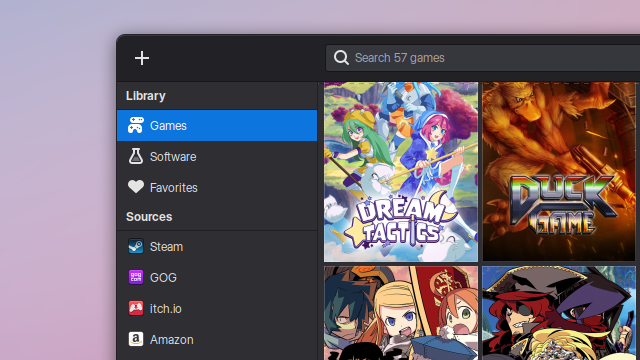
Let’s focus on the grid first, since the grid is the focal point of the entire program. The first step is to standardize all posters to a consistent aspect ratio. We’ll use the Steam Vertical (2:3) format using assets fetched from SteamGridDB. Then, we scale the size down slightly and tighten the margins, aiming for a balance between dense and cozy.
To finish the look, we’ll add a subtle, semi-transparent white outline to make the margins stand out more. And, wow, it already looks significantly better than before. We still have some performance-related aesthetic changes to make later, but for now, we’re just focusing on getting the “still image” right.
UPDATE: Moments before publishing, I decided to make the grid background slightly darker. You won’t see this reflected in the upcoming pictures for two reasons. First, the change is extremely subtle. Second, I really did not feel like retaking a dozen screenshots for something this stupid.
Sidebar
To clean up the Library view, I added a more pronounced separator and removed the “Recent” and “Uncategorized” options. These felt underused and largely redundant. “Uncategorized” is especially pointless as it only exists to remind you that you haven’t sorted all of your games.
If you really need these features, I’ve added an option to re-enable them in the settings. You can even disable conditional categories (like “Missing”) if you really want.
The sidebar entries have been rearranged based on relevance, as decided by me. Steam is the most popular storefont, so it logically takes the top spot. The icons themselves also received a facelift; while the default application pulls icons from the system, the names are often too generic to be useful. There are also fallbacks to generic icons and names built-in to maintain compatibility across different systems.
You might have also noticed a new “Software” button – shut up.
Bottom Bar
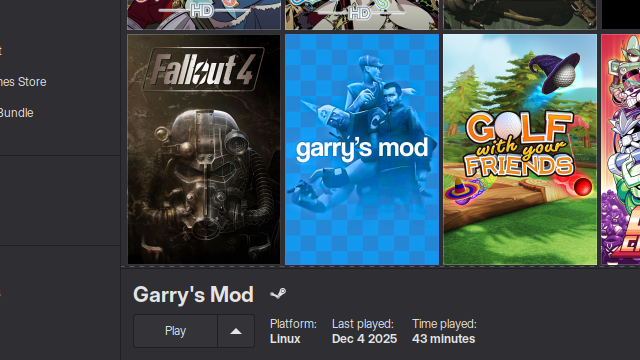
The bottom bar, if I remember correctly, proved to be the most stubborn part of the source code to refactor. Mostly because I am blind. But hey, there is now a top outline! Before it was just a floating grey box.
The platform icon has also been relocated to the right of the game title; previously, it sat inline with the control buttons and awkwardly shifted the layout. Lastly, there were some minor adjustments to the spacing and layout that might seem minor. Honestly, not the most exciting change, but it provides more “visual stability”.
Menus
Right-clicking a game on the grid no longer triggers a sprawl of options. Most of the niche entires and unused web integrations are gone. The remaining items are reorganized in, what I personally think is, a much more functional arrangement. “Show Logs” and “Browse Files” are now paired together, while the “Configure” button is separated from “Add To Favorites” and “Hide Game”.
Instead of a messy “popover” menu, the options have now been consolidated into less cluttered, cascading context menus with distinct separators. For example, Wine Registry, Control Panel, and what-not are grouped under “Wine Tools”, which cuts the menu down from 8 options to 5. The standard context menus also take up way less vertical space.
The main hamburger menu received similar treatment with non-critical links like Forums, Discord, About, and Donations being moved into the settings menu. You also don’t really need to see these all the time.
Of all the changes I made, this one seems to have the biggest impact on usability and most people appreciated. I did skip over some minor things. But this is definitely enough time to be dedicating to context menus.
Settings – Preferences
Even more exciting…the “Preferences” or “Settings” menu. This is another “vibes-based” approach to UI, but the result is an immediately cleaner and less chaotic settings menu. For example, generic “Interface” section has been split between two distinct categories, “Appearance” and “Behavior”. It also moves the more relevant options to the top of the list.
Lutris.net integration has been removed, and the Runners menu has been purged of unused entries. This reflects my specific needs, but everything hidden can be restored under a new “Custom Settings” menu.
The “Custom Settings” menu acts as a repository for all of my specific tweaks. It handles everything from inserting your SteamGridDB API key, hiding certain interface elements, or disabling the double-click to launch behavior (which I always hit by accident). It is just important to note that despite the visual overhaul and obvious refactoring I’ve done, a majority of Lutris’ functionality has been left in-tact.
Error Message & Message Boxes
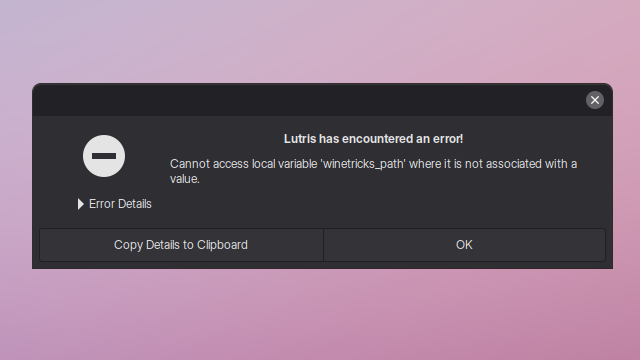
It is difficult to appreciate just how bad the original error message box looked without a side-by-side comparison, but I’ve cleaned it up with better spacing and formatting so it doesn’t look broken.
I also disabled the links to the official Discord and GitHub issues. Since this is a custom build, any bugs you find are likely my doing, and I don’t want anyone else dealing bugs that are almost certainly my fault.
Performance
Less Lag When Scrolling
I noticed a consistent issue where large libraries would lock up the main thread while loading images, freezing the app for a split second. My fix, which probably isn’t even a fix, was to force the initial load to none and shift the image rendering to the background. This completely eliminated the freeze.
I also added a fade-in effect to handle the transition, which you can see in the image above. It looks great and feels much more modern. Even if this fix is stupid, this aesthetic improvement sort of justifies it.
Features
The “Software” Tab
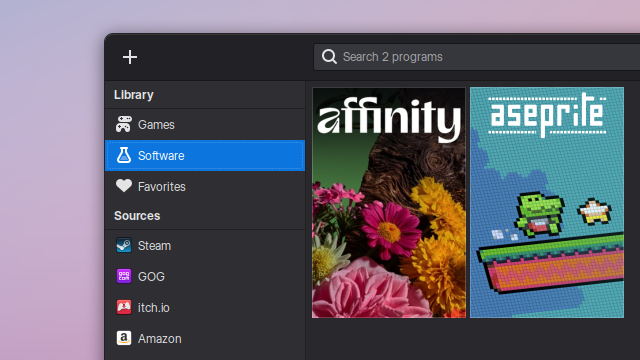
Finally, we get to the “Software” button. This feature lets you clearly distinguish between Games and Software in your library. It was largely inspired by the AffinityOnLinux guide. As I said before, Lutris is actually a pretty competent Wine manager for standard Windows applications.
I don’t love this integration, but all you have to do is open the configuration menu for any title and select “Is Software” from a dropdown. This will hide the poster from the “Games” view and moves it to the “Software” view. Pretty cool?
“Add Locally Installed Game” Improvements
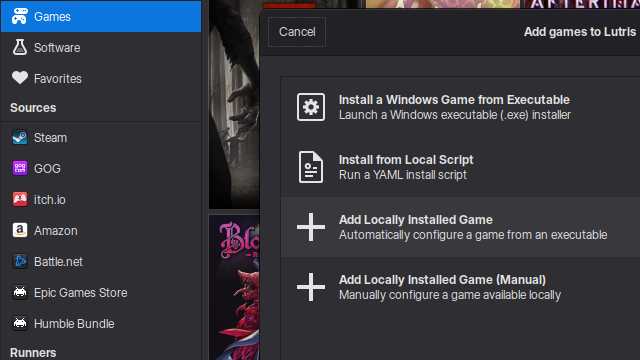
The “Add Games” menu now includes an improved version of the “Add Locally Installed Game” option. It automates some of the process, which cuts out the redundancy of the old manual selection method and saving precious minutes of your life.
Typically, you have to manually fill out the Name, Executable, and Runner one-by-one. Now, you simply navigate to your directory and select a file, such as a .sh script or a .exe. The installer script checks the file and location and autofills everything for you, including selecting the appropriate runner. In my testing, it works pretty much every time.
Run Without Launching Steam
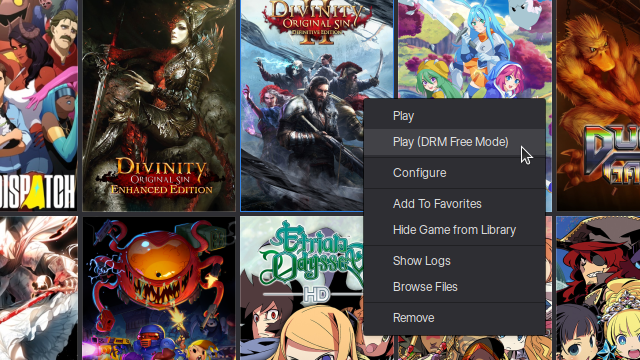
This is technically a native feature, but accessing it usually involves flipping a toggle switch on and off in the configuration menu. Now, you can simply right-click and hit “Run (DRM-Free Mode)” to bypass the launcher on the fly without changing global settings.
This is the type of common-sense feature I want to implement more of. Ideally, I’d like to add similar options for things like running games with specific arguments or launching in a specific locale, rather than burying them in configuration menus. Also, I could have come up with a better name. But I don’t really care…
Support for Additional Runners
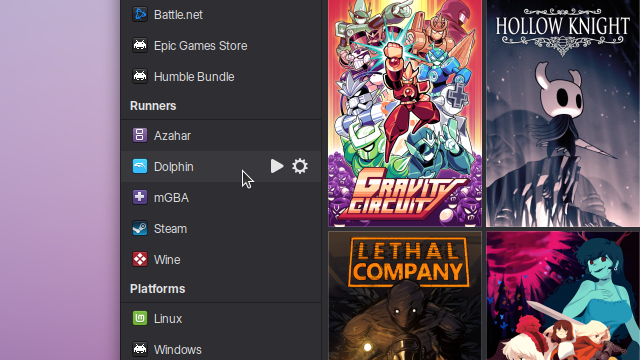
I can’t take full credit for this one, because this was one of the pull requests that were integrated into my build. The most notable addition is Azahar, a 3DS emulator. I’ve sort of wrapped my head around how adding runners works, and getting this running in the interface feels like a small win.
It is one of those things I would be remiss not to bring up. And I hope you’ll forgive me for padding the readtime of this post a bit longer. Lorem Ipsum.
Conclusion
Are you going to release this build?
Maybe! Right now, though, it’s a “friends and family” release. I don’t have the time or energy to provide tech support for user base as large as this one, and frankly, the project was designed for my specific needs only. There is also the issue of the code itself. It’s a mess of dormant, half-finished features that aren’t ready for the public. It was, and still is, a weekend project.
Are you going to submit any pull requests?
Maybe! But you really don’t want my code, dude. There is a massive difference between working by yourself and working on a team where you have to respect everyone else’s work. Some of these changes might actually warrant a hard fork of the project. I’m confident in my features – I think they’re sick as hell – but I also think it is wiser to hold off on posting for now. (but also shoot me an email!!!)
Are you happy with it?
Absolutely. I have a lot of love for Lutris, and working on this was a lot of fun. I also walked away having learned a few new things about Linux app development. The entire process was (mostly) painless from start to finish.
This highlights exactly why I love the Linux ecosystem. You have the freedom to tinker, to build exactly what you need, and to feel a genuine sense of ownership over your tools. I took a project I liked and molded it until it fit me perfectly.
I encourage everyone to do the same. Go make dumb, small things that serve no one but yourself. The amount you learn and grow from it will mean something.